ShareThis

Thursday, 14 February 2013

TOP 20 must have ANDROID APPS

       Android operating system is the most in demand OS because of its open source capability,due to which it supports lots and lots of applications.today in this blog I am going to write about 20 must have apps and games in your android phones.so lets start our blog for today.

1)
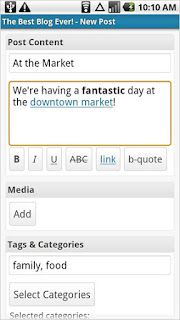


WordPress

WordPress is one of the most popular blogging platforms, boasting over 25 million software downloads and 15,000 plug-ins. If you wish to blog while away from your computer, this WordPress app will let you do just that, but on your Android phone. Bloggers can quickly create drafts, edit posts, and approve comments without the need for a Mac or PC.

2)
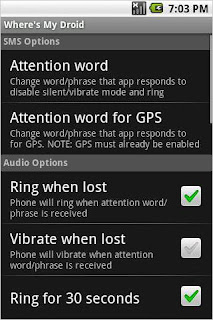


Wheres My Droid

If you're anything like me, you've "lost" your phone many times only to find it tucked away in a jacket pocket or some other obvious—or not so obvious—locations. Now you can save yourself plenty of worry with Wheres My Droid, which forces your phone to ring at maximum volume or vibrate when the phone receives a text message containing a specified phrase, such as "Where's my Droid?" The app can also tell you the phone's location, as long as its GPS is enabled.


3)
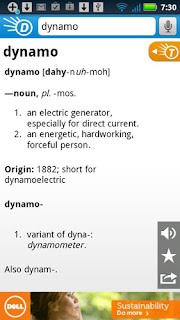


Dictionary.com

Stuck on a word's definition? The add-supported Dictionary.com app is a great tool for quickly looking up word meanings. Best of all, the dictionary and definitions live on your phone; no need to connect to the Web to pull down the information that you seek.

4)
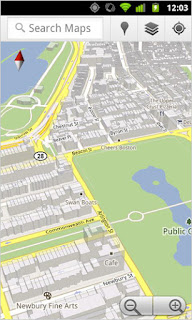


Google Maps
Google Maps is a potent tool for any Android smartphone owner who needs location information. A few of its signature features, such as navigation and layers, work better on Android than most other mobile operating systems. It's indispensible for finding addresses, service providers nearby, and basic navigation.

5)


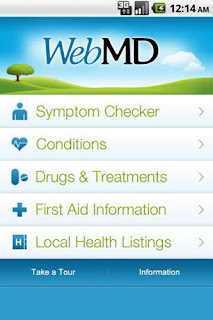
WebMD for Android

WebMD is much more than a diagnosis app, although you certainly can use it to input symptoms you are experiencing and find some clues as to what's ailing you. It also contains listings for healthcare professionals and pharmacies in your area, as well as first-aid guides—simple instructions for dealing with an emergency that everyone should have accessible at any time. This free reference app is one you hope you don't need, but, the moment you do, you'll be glad you downloaded it.


6)


Wikidroid for Wikipedia

Smartphone are called "smart" because they enable you to keep a hefty amount of information in the palm of your hand. Wikidroid is a prime example of this;
the app pulls articles from Wikipedia and optimizes their display for easy reading and searching from your mobile phone. The app has elegant search functionality, too.


7)


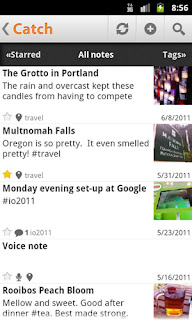
Catch Notes

Catch is a cloud-based service that lets you save notes of all kinds—audio memos, typed notes, and photos. If you think it sounds like Evernote (see below), you're right. It's similar to that app, and well customized for Android phones. If Evernote isn't quite your speed, but you're looking for something similar, give Catch a try.


8)


Dropbox

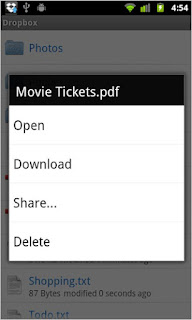
Nearly everyone works and plays on multiple computers, which means that you have files scattered across numerous machines. Dropbox comes to the rescue with a service that lets you keep files in sync across multiple computers simply by moving them into the Dropbox folder. The Dropbox Android app lets you access those files—and sync new ones—on your Google-powered smartphone.
9)


Facebook for Android

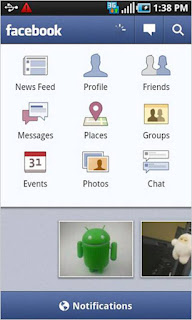
Social networks thrive with a reliable app, and Facebook's for Android is solid. The Android app has the quintessential Facebook-branded interface but some unique functionality that's absent in Facebook's iPhone app, such as a side-scrolling preview pane of recently shared photos in the dashboard area.

10)


Foursquare

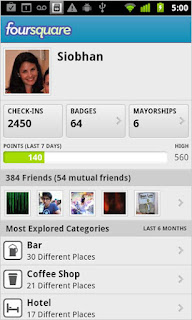
Love it or hate it, no respectable app store is complete without Foursquare, the popular social networking application that lets you check you into locations. You can easily tell your friends where you are, share photos, and view comments. Plus, many businesses offer discounts and freebies to foursquare users, so you may save cash while checking in.

11)


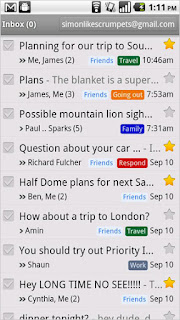
Gmail

Gmail, Google's e-mail application, comes to Android devices as a dedicated app. With it, Gmail users can star, label, search, and access synched messages when offline. It also supports multiple Gmail account, so you can check messages from all your accounts on one device without signing out.

12)


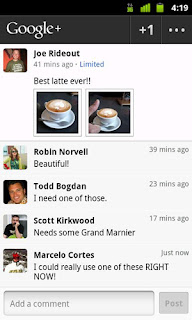
Google+

 Social networks need mobile apps to thrive, and Google+'s is a fine start for the platform that arrived in July 2011. The app taps into conventions established by other online social networks, like Facebook and Twitter, while finding some of its own strengths at the same time. Google+ Mobile works fairly well, due to a smart design and comprehensible interface.
13)

Google Voice

With voicemail, text messaging, and other great features, Google Voice is an excellent service that is a welcome addition to Android phones. Use it whenever your traditional phone carrier would otherwise charge you big bucks—such as when placing pricey international phone calls.
14)


Angry Birds

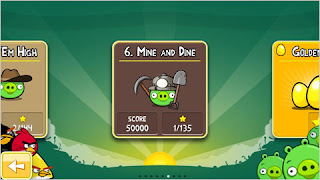
You can't have mobile devices without Angry Birds. The causal game juggernaut that just keeps rolling, challenges you to destroy structures (inhabited by villainous swine) by flinging crotchety little birds at it using a giant slingshot. The franchise has dozens of titles, like Angry Birds Rio and Angry Birds Seasonal, but the original Angry Birds is the one to download to your Android phone first.


15)


Guns 'n' Glory: WW2

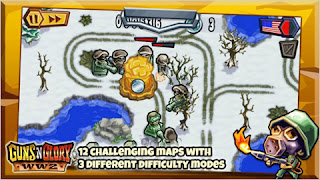
The follow-up to the award-wining action-strategy game Guns 'n' Glory Wild West puts you in the role of a military commander (either the Allies or Axis) during The War. You mission? Guide your troops, tanks, and warbirds to World War II victory. A RPG-like skill and leveling up system lets you power up your squad to achieve an advantage over the enemy.

16)


Words with Friends Free

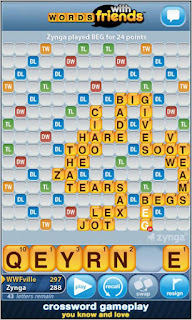
Words with Friends, Zynga's take on popular board game Scrabble, is among the most popular (and addictive) mobile social game. If you own an Android phone but your friends are on other devices, such as iPhones or iPads, you can still challenge them to head-to-head wordplay. Some Android users have reported stability problems with the game, but Zynga has pushed out updates that should improve the apps overall performance.


17)


FxCamera

If your Android smartphone has a less-than-stellar camera, don't fret. FxCamera adds filters and effects, such as "ToyCam" and "Warhol," to enhance even the most modest photos. It also helps to arm yourself with some additional tips for getting better photos from your phone. In short, if you take snaps on your Android phone, consider this a must have app.

18)


Google Goggles

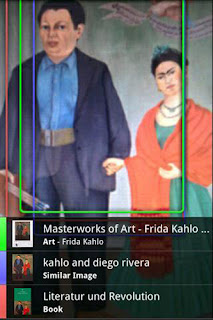
Google Goggles is an augmented reality experience that layers additional information from the digital world onto the physical world. For example, you can whip out your phone, take a snapshot of anything from a painting in a museum to a placard that's written in a language you don't understand, and Google Goggles will give you more clues to help you figure out what's in front of you, or why it's important.

19)


Kindle

Read books, magazines, and newspapers right on your Android phone without ever buying an e-reader. The Kindle app is by far the most popular reading app in the Android Marketplace because it gives you access to buy or download for free hundreds of thousands of books, and more than 100 different newspapers and magazines. And while some users have complained that they can't uninstall Kindle once they've downloaded the app, it is possible (but it takes a little effort).

20)
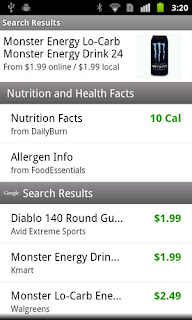


RedLaser Barcode & QR Scanner

RedLaser, an app that turns your Android's camera into a barcode scanner, has long been on every new smartphone owner's list of free apps to download. Overtime, the app has only improved, and it's now a multi-functional scanner that works on QR codes, too. When shopping, scan any item with a barcode, and RedLaser delivers detailed information about the product, including whether you can buy it at a better price nearby.


           Your feedback for any more application you know about which are great is always welcomed.. :)


Saturday, 12 January 2013

How to find creation date of your Gmail account?


                You might think for what reason would we require your Gmail account creation date, but you  would thank me once you forget your Gmail password. when you forget your password and can't even remember security question you are left with this option, it asks you creation date of your gmail account. so here are the steps to know your gmail creation date in a easy manner.


image courtesy: wikihow

Method 1:


This is one nice method to know creation date of your account. Gmail team sends you a welcome mail during creation of your account so you can click on oldest post on your Gmail account and get that mail. After opening it you will find its creation date. so keep that in mind. might be helpful if your account is hacked and security question is not quite helpful.


Method 2:


This method is little complicated then previous one but will help you in case you have deleted that mail accidently before. 

GoTo www.google.com/takeout

there you will find "transfer your google+ connections to another account" click it

New tab will open with name google pus transfer tool, 

where account type and creation date will be given,

 take note of it and close that tab without making any changes


Method 3:

We have one more method to know creation date of our gmail account, 

Goto Settings in gmail/google+

then click on forwarding and POP/IMAP

In Pop Download 1) Status: POP is enabled for all mail that has arrived since


Creation year of my account is 2007, whats yours? 

Friday, 28 December 2012

Project Glass-Next big thing in tech world.


                We people are always hungry for change in the way we live, we were not satisfied with telephone so we invented mobile, we were not satisfied with cycle hence we invented bikes and scooter. our only aim here was to make that particular product better and reduce human effort. so one of our finest company 'GOOGLE' was not happy with normal eye wears so they came up with something new.and interesting. basically we can say that they have made new category itself for this product. As apple made new category of products with invention of iPhone, Google is trying to do the same here. Project glass is basically an eye wear having an android operating system, it can basically display information in a smart phone type display and main thing is it can interact with internet. it is basically a eye wear which can do lot of thing.
glass on it  looks like only the headband of a pair of glasses — the part that hooks on your ears and lies along your eyebrow line — with a small, transparent block positioned above and to the right of your right eye.


photo courtesy verge


   According to Wikipedia project glass can be described as--   Project Glass is a research and development program by Google to develop an augmented reality head-mounted display (HMD).Project Glass products would display information in smartphone-like format hands-free and could interact with the Internet via natural language voice commands.
           This project is still in development process so just developers are being provided with it for $1,500. 
how google glass works

So you people would be thinking what use this project glass or google glass will to us?

           Google is not planning to release it before 2014. this glass are lot more then normal eye wears it can click photos, tell you current temperature, time, Google has proposed icons for things like taking a picture, recording video, making a phone call, navigating on Google Maps, checking your calendar, surf net (Google said it will have cellular radio later through which it can get online, at present it uses your phone's wireless network to connect online). Inside the right earpiece that is, the horizontal support that goes over your ear Google has packed memory, a processor, a camera, speaker and microphone, Bluetooth and Wi-Fi antennas, accelerometer, gyroscope, compass and a battery. All inside the earpiece. Glass is designed for two primary purposes sharing and instant access to information  hands-free, without having to pull anything out of your pocket. Google has also shown that you can use speech recognition to control Glass. You say “O.K., Glass” to call up the menu.

This is wonderful project and a realistic one if it is priced correctly. Google co founder SERGEY BRIN is seen with this glasses in almost every tech events.we can be pretty sure that this invention is going to be huge step in making us lazy, as even removing your mobile from your pocket will be of no use as it will fo all task of mobile phones. only thing Google need to do is to keep price of these glasses down, and it will be the next big thing in tech world.


Here are some videos which might amaze you:

 
        Google glasses demo by Sergey Brin


                       Google glass demo


Thursday, 13 September 2012

How Search engine works?

           
                   No matter what our age is,what our nationality is we always rely on search engines for getting our facts right, to get some data which we know can be known best when  found online.we always depend  on search engines, search engines could be any Google or altavista. but all works in same way. I came across this topic through online course of Google i.e "powersearching with Google". so at the end of this post I am going to post the link for that course, incase you want to learn power of searching from Google.

        Whenever we want to search some data we head to search engines or say Google for most of us, but have you ever noticed that like us there would be many people who use search engine at that very moment. Search engines receives millions and millions of queries per day, so how exactly would it serve so many people? our common assumption is that Google gives us the page which is most viewed by most people on internet, and your assumption is right also. But you should even consider the amount of websites which are started daily. for example, say 1000 of sites mentioning user interface on your mobile devices, so you cannot assume that no one is ever going to write about that topic in future. yesterday 1000's were there today you may get 5000. so search engine has to scan all the websites that it receives daily, because they can't leave any website without considering or checking.so we can clearly assume that on daily basis it has to add hundreds and hundreds of websites to its databases, so we can have most relevant and useful data. According to Wikipedia :- " A web search engine is designed to search for information on the World Wide Web". so basically you get sites related to term you searched on search engine.Search engines don't create any website or give you any data but it gives link or reference to the data you searched in search engine, that to in the form of websites or links to that websites. And these search engines give you result irrespective of the name the blogger or writer on that particular website has named his article as.There are many instance where the heading of the articles is not at all matching with the term you had searched in search engine then to you got the reference of that site and the material or the data in that file is what you were searching for.so how do search engine gives you reference of the sites from billions of site out there on internet?

     so how would this search engine would be working?

The main three things on which search engines works are:
  1. They search the Internet -- or select pieces of the Internet -- based on important words.
  2. They keep an index of the words they find, and where they find them.
  3. They allow users to look for words or combinations of words found in that index.
Any website you give search engine permission to scan( there are many personal blogs and sites on the net that many don't want to share with whole world) or include it in their database are searched throughout. all the terms are noticed by it and stored in its databases with the location of your site. so next time when someone comes searching for term that was mentioned in your website or page is shown there but according to the priority given to your site by search engine which notices web traffic to your site.so scanning of the pages are done according to the popularity of the page and that site. so the page with more visitors will be scanned first, and so on. so what is that program called as? it is known as "spiders", it is software robot which is made to scan any webpage that is added or modified on internet (that page has to give access to spiders,otherwise it won't be listed on net). it not just scans the page as it is, it scans the site and saves the words used there, that words are stored in its database along with the location of the site. The process in which whole document is scanned is known as web crawling ( so you can use more technical term for scanning as crawling).All the spiders have there own approach 


                                           what are web spider?how they work are explained here   When the Google spider looked at an HTML page, it took note of two things:
  • The words within the page
  • Where the words were found
             Words occurring in the title, subtitles, meta tags(  Meta elements are HTML or XHTML elements used to provide structured metadata about a Web page) and other positions of relative importance were noted for special consideration during a subsequent user search. The Google spider was built to index every significant word on a page, leaving out the articles "a," "an" and "the." Other spiders take different approaches. These different approaches usually attempt to make the spider operate faster, allow users to search more efficiently, or both. For example, some spiders will keep track of the words in the title, sub-headings and links, along with the 100 most frequently used words on the page and each word in the first 20 lines of text. I got this very nice thing to read about Google from howstuffworks,
"  Google began as an academic search engine. In the paper that describes how the system was built, Sergey Brin and Lawrence Page give an example of how quickly their spiders can work. They built their initial system to use multiple spiders, usually three at one time. Each spider could keep about 300 connections to Web pages open at a time. At its peak performance, using four spiders, their system could crawl over 100 pages per second, generating around 600 kilobytes of data each second.Keeping everything running quickly meant building a system to feed necessary information to the spiders. The early Google system had a server dedicated to providing URLs to the spiders. Rather than depending on an Internet service provider for the domain name server (DNS) that translates a server's name into an address, Google had its own DNS, in order to keep delays to a minimum."
 
how search engine works? explained here.
click on this link to register for registering for power searching seminar by Google, you also will be getting an certificate (that to from Google.com).There are many thing that would surprise you there. so guys if you want, do register there and get some great knowledge from master himself and certificate as complimentary gift.
   
*many things in this post are referred from howstuffworks, just to give you right technical knowledge about the topic and not with intention of making any revenue through it.

Wednesday, 6 June 2012

Technology have to play a role in saving water

     
      I think that technology is the only thing that can help us save water now,because the way we are using our resources I don't doubt it will be exhausted in few decades.but we might only think that we have enough resources that will easily be available till 80-90 years after that we will not be alive to bear its after effects so its okay if we don.t care about it,but that's wrong mentality we have towards nature because even if we won't be alive our children will have to suffer through this and I can bet that no parent will  want their children to go through Hell for the sake of water which they wasted because it was available to them. 
      For me water is the most important natural resource even more important than oxygen.because for oxygen we are blessed by some nice invention by some great personality(I am not searching Google for that personalities name here because our today's topic is for water) who have invented oxygen cylinder and even more technologies are been found for the same.but we cannot say the same thing for water because till date we have not found substitution for water.Water is such a resource that is used in almost all thing you use in daily life,let it be your morning coffee or cola or pepsi you drink,let alone foodstuffs it is used in manufacturing purpose also,it is used in power plants,Pressurized water is used in water blasting and water jet cutters. Also, very high pressure water guns are used for precise cutting.
so this were some of the uses of water we can think of at any given time.

         So basically we can say that we have not found any substitution for water till date.And what effect it will have on us will be known in long run.so many will ask what type of technology will help us to conserve water resources.so now if truly speaking, I feel that we are way beyond that part when merely closing tap will help us save water.Now that is just basic thing we have to do for saving water.so which technology and how to implement them can be best explained by our scientists because always EXPERT help us get through tough times,we are the ones who can just write about it but they are the one's who have to implement it. so talking about technology we would have never imagined that we will receive water by merely turning the tap and water from hundred's of kilometer away will flow to us. so that is what which was made possible to us by experts.next example can be of Air conditioner,our fore fathers would have never imagined that we can get below room temperature by just a click of button,and even that is possible now.so you consider any technology let it be fan,computers,mobile phones,toasters or any electrical equipment ,nobody would have imagined before the discovery of that product that it would be so easy to perform that activity.In the same way we want just one technology that can do the same for water,because by turning the tap we all receive water but think of that day when, after turning the tap you would receive water after 7-8 days because there is no water available for us.and luxury of getting water everyday will be the thing of past. 
             
     You might think of above statement as an example but it is reality in many remote parts of India.You won't believe it but in remote parts of Gujarat people receive water after gap of almost 7 days,that's not because Government is not taking initiative for water conservation project but due to water scarcity in that region.And due to that building dams yields no result as there is irregular rainfall in that region.And due to water scarcity people started using ground water for daily purposes due to which ground water level has also decreased.so what steps to take to slightly normalize the situation? steps are same that you,me all would have learnt at some point of time 
"To plant more and more trees in your environment".
        But we don't have time for such filthy works now as we are very busy with our daily life.but think we just have to give few minutes for it..and it can help you,your children and maybe even their children.Few days back I had read about level of pollution in our rivers(and it includes most of major Indian rivers) which has made it unsuitable even for agriculture purpose let alone drinking that water.if we would have helped in maintaining that rivers then we can at least get some other sources of water to consume apart from dams but due to human nature one more source of water has been exhausted.so now we are left with only one alternative, i.e. Rain water in our dams.Rain is unreliable source of water so relying on it will leave us with no water in long run because of deforestation activity undertaken by us.

       we need many activists to join hands to save this resources,to make government know the importance of water and to clean our holy rivers(so that it can be of some use to human race).

So guys spread this article for the sake of water you consume.
THIS GOVERNMENT HAVE TO DO SOMETHING SOLID FOR THE SAKE OF ITS OWN PEOPLE.

Saturday, 28 April 2012

Sixth SENSE TECHNOLOGY

          Whenever we start counting great technologies that have made science look real to human race,sixth sense technology cannot be left behind. As many may think,that this technology work on your sixth sense,but sorry to disappoint you this technology has nothing to do with your sixth sense. This technology fascinates me because of two reason, First reason to describe it as great technology can be the fact that it is invented by an Indian, and second can be the mere fact that you can can access an information with your bare hands wearing an gesture interface.
         

        'SixthSense' is a wearable gestural interface that augments the physical world around us with digital information and lets us use natural hand gestures to interact with that information.

We've evolved over millions of years to sense the world around us. When we encounter something, someone or some place, we use our five natural senses to perceive information about it; that information helps us make decisions and chose the right actions to take. But arguably the most useful information that can help us make the right decision is not naturally perceivable with our five senses, namely the data, information and knowledge that mankind has accumulated about everything and which is increasingly all available online. Although the miniaturization of computing devices allows us to carry computers in our pockets, keeping us continually connected to the digital world,
 there is no link between our digital devices and our interactions with the physical world. Information is confined traditionally on paper or digitally on a screen. SixthSense bridges this gap, bringing intangible, digital information out into the tangible world, and allowing us to interact with this information via natural hand gestures. ‘SixthSense’ frees information from its confines by seamlessly integrating it with reality, and thus making the entire world your computer. 

           The SixthSense prototype is comprised of a pocket projector, a mirror and a camera. The hardware components are coupled in a pendant like mobile wearable device. Both the projector and the camera are connected to the mobile computing device in the user’s pocket. The projector projects visual information enabling surfaces, walls and physical objects around us to be used as interfaces; while the camera recognizes and tracks user's hand gestures and physical objects using computer-vision based techniques. The software program processes the video stream data captured by the camera and tracks the locations of the colored markers (visual tracking fiducials) at the tip of the user’s fingers using simple computer-vision techniques. The movements and arrangements of these fiducials are interpreted into gestures that act as interaction instructions for the projected application interfaces. The maximum number of tracked fingers is only constrained by the number of unique fiducials, thus SixthSense also supports multi-touch and multi-user interaction. 

          
          The SixthSense prototype implements several applications that demonstrate the usefulness, viability and flexibility of the system. The map application lets the user navigate a map displayed on a nearby surface using hand gestures, similar to gestures supported by Multi-Touch based systems, letting the user zoom in, zoom out or pan using intuitive hand movements. The drawing application lets the user draw on any surface by tracking the fingertip movements of the user’s index finger. SixthSense also recognizes user’s freehand gestures (postures). For example, the SixthSense system implements a gestural camera that takes photos of the scene the user is looking at by detecting the ‘framing’ gesture. The user can stop by any surface or wall and flick through the photos he/she has taken. SixthSense also lets the user draw icons or symbols in the air using the movement of the index finger and recognizes those symbols as interaction instructions. For example, drawing a magnifying glass symbol takes the user to the map application or drawing an ‘@’ symbol lets the user check his mail. The SixthSense system also augments physical objects the user is interacting with by projecting more information about these objects projected on them. For example, a newspaper can show live video news or dynamic information can be provided on a regular piece of paper. The gesture of drawing a circle on the user’s wrist projects an analog watch. This article has been taken from Pranav mistry's official site

Friday, 16 March 2012

Distributed Computing

         
             First you'll think what is distributed computing? you might have heard of distributed systems where a collection of independent computers that appears to its users as a single coherent system. where many machines are working together to fulfill users requirement but user feels that he is working on a single machine. so what is distributed computing then?   Distributed computing is a science which solves a large problem by giving small parts of the problem to manycomputers to solve and then combining the solutions for theparts into a solution for the problem, In a distributed computing setup, the program runs like itwould in a single computer even when it is, in fact, usingdifferent computer processors.


why to use distributed computing?

  • A computer that is part of a distributed computing network usually has a program installed in it that is its direct link to the administrative server or servers.
  • The software remains dormant in the individual computer until such time that the computer's system becomes idle .
  • At this point, the software will be activated and will inform the administrative server about available resources in the computer.
  • The administrative server will respond by sending an application package to the requesting computer.
  • The moment the user has need of his own resources again,the management server will immediately relinquish the resources that it has been monopolizing, back to the owner of the computer.

what are the challenges you will face in distributed computing?

  1. Heterogeneity
            Various Systems in the Distributed must be able to communicatewith each other despite of different:
  • Hardware
  • Programming Language
  • Operating Systems
  • Network
    2.   Scalability

          The system should work efficiently with increase in number of users.
     

    3.   Security

  • Security in Distributed system consists of two Components:Confidentiality: Protection against unauthorized users.Integrity: Protection against alteration.
  • Encryption techniques can be used.

  4.   Transparency

        
         The Entire System Should appear as a Single Unit and theInteractions between the Components should be typicallyhidden from the Users.


Applications:
  • Telephone Network.
  • Computer network such as the Internet.
  • aircraft control systems.
  • Banking system
Disadvantages of distributed computing:
  • A lot of extra programming is required to set up a distributed system.
  • If not planned properly, a distributed system can decrease the overall reliability of computers.
  • A node could get a work unit, and then not complete it, which would affect remaining nodes.


Thursday, 8 March 2012

My Colorful day-HOLI


                  First of all, HAPPY HOLI . I am sorry about writing nontechnical topic on this blog, and I wrote this topic because this is the festival I like the most among all INDIAN festivals. And I will not bore you with this topic . and first of all this topic is for all our friends outside India or people in India who doesn’t play Holi. You all will be thinking that this guy is trying to make us understand what holi is, but I am sorry to disappoint you’ll again because I won’t tell you’ll what is HOLI and why is it celebrated..Because that data you can easily get it on net by taking our friends help . So bear with me for this topic where I share with you all things we (by specifying we I meant along with my friends) used to do while playing holi.

              When we were of around 9 year Holi meant lot of fun. We used to go around splashing water on everyone in our way while returning from school, after returning from school we used to directly head to our house to get our water gun, and after getting water gun we used to spray water on every one coming in our sight (Holi and diwali are the only festival in Indian calendar where you can literally grab a gun and run around everyone but obviously I am talking about toy gun) and believe me it was fun then. Then gradually we age with time and holi meant something different for us. Now being of around 16years holi had some other meaning. Grabbing a gun was thing of past and doing so meant you are immature among your friends. After this holi had another meaning, we used to throw water in small plastic bag (you can call it water bomb) . When you are in college it seems so much cool to throw this water bombs on pedestrians or your friends from your building terrace. And many times it takes some help from police to stop us from throwing it below. But personally nor I or my friends have experienced police intervention in any past years during holi. I was just saying about police by knowing about many people from my locality.
this is the color(gulaal) I was talking about.

applying color
        And during day of colors (we call that day as dhuleti) you cannot imagine in your wildest dream your body can be so colorful, and that color being normal one made from flower petals used to get off body fast and easily. 
But as you grow up you learn many things such as use of water bombs was limited. Now we use it only occasionally to take revenge among ourselves or to relish your gone days. Now with age even your habits changes, first we used natural color to apply on each other’s face or body. Then as you grow up playing with it also means now you have to change it, so now we play with OIL PAINT (yes you heard it right). 
during holi your face looks somewhat like this
 And to tell you oil paint takes nearly 3-4 days to restore your skin to same color. I know it is harmful to play with but you can’t really help because friends will be friends and you can’t change them by saying that dude please stop applying me this paint because its affecting my skin. But truly speaking even I like to play with it. Holi is the festival you can play freely and enjoy playing it.


this is how your face look after holi,you can compare this photo with one I have  in my bio section.

[All the thing described above is the way I have played holi, I can’t say that this is how whole INDIA plays it. But it would be something similar only. And photos shown here are some of the extreme way you can play holi. I don’t think everybody plays in same way.]